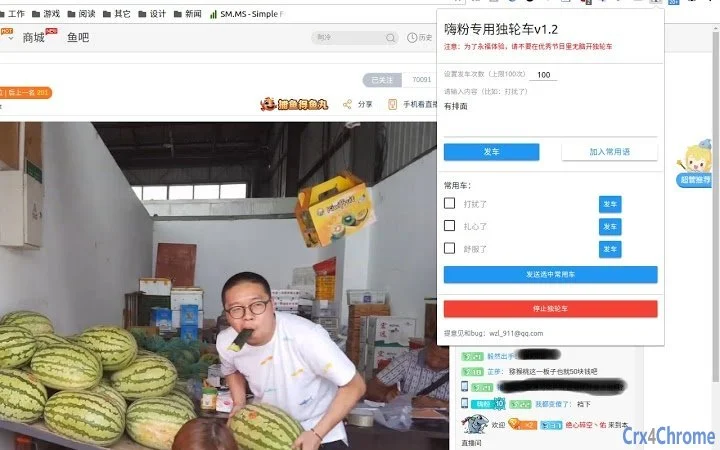

Auto-Danmu for Douyu
Overview
The Auto-Danmu for Douyu tool is designed to automate the sending of chat messages within live streaming environments on the Douyu platform. It enables users to send pre-defined messages—referred to as "dancar" content—quickly and repeatedly, streamlining communication during live broadcasts. The tool is intended for use in live chat scenarios where consistent messaging is desired, such as supporting streamers, participating in community events, or maintaining engagement across multiple streams. It supports operation across multiple browser tabs simultaneously, which enhances its utility for users managing several live sessions at once.
While the developer did not provide additional background information, the tool appears to be tailored for fans and active participants in the Douyu community who seek efficiency in chat interaction. Its core purpose is to reduce manual input while maintaining an active presence in live streams. The software does not include features for message customization beyond predefined content, nor does it support real-time message generation. Users are advised to use the tool responsibly and avoid actions that may disrupt the live experience for others.
Key Features & Capabilities
- Automated Danmu Sending – Allows users to send pre-set messages automatically within Douyu live streams. This feature reduces repetitive typing and helps maintain consistent engagement during long broadcasts.
- Multi-Tab Support – The tool functions across multiple browser tabs simultaneously, enabling users to manage multiple live streams without switching between windows.
- Loop Mode (Multi-Car Mode) – Introduced in version 1.2, this feature enables continuous, repeated message delivery. Users can activate loop mode to send messages in cycles, ideal for sustained presence in long-running streams.
- Abstract Passphrase Protection – A security measure added in v1.2 to prevent unauthorized use or "stealing" of message content. This helps preserve the original intent and ownership of shared messages.
- Real-Time Content Update – In version 1.1, the tool was updated to allow immediate message changes without requiring a stop command. Users can input new content and start sending immediately.
These features support efficient, low-effort participation in live chat environments. For example, a user managing multiple stream channels can set different messages for each and activate them simultaneously. The loop mode is especially useful during extended streams where consistent messaging is desired without manual intervention.
User Interface, Workflow & Performance
The tool operates as a browser extension with a minimal interface, designed for quick access and ease of use. Users interact with it by opening the extension panel within the browser, entering their desired message, and initiating the send function. The workflow is straightforward: input content → select options (e.g., loop mode) → start sending.
Navigation is limited to the extension’s popup window, which contains input fields and control buttons. No complex menus or settings are present, which simplifies the user experience. The tool does not require a dedicated desktop application; instead, it runs within the browser environment, leveraging existing web technologies.
The developer did not specify resource usage details. Performance observations are based on general software behavior patterns. The tool is expected to have low CPU and RAM impact, given its lightweight nature and reliance on browser execution. Stability is assumed to be consistent with typical browser extensions, though real-world testing is required for confirmation.
Compatibility & System Requirements
Auto-Danmu for Douyu is compatible with Windows and Mac operating systems. It functions as a browser extension, meaning it relies on the browser’s environment for execution. The installation size is 1.5 MB, indicating a lightweight footprint.
Exact system requirements were not listed. Compatibility information is limited to the supported platforms. No specific hardware specifications were provided. Users should ensure their browser is up to date to maintain optimal functionality. The tool requires a browser with extension support and access to the Douyu live streaming platform.
Pros and Cons
Pros
- Lightweight at only 1.5 MB
- Supports multiple browser tabs simultaneously
- Loop mode enables continuous message sending
- Real-time message updates without stopping
- Includes protective measures against message theft
Cons
- No detailed system requirements provided
- Performance resource usage not specified
- Only works within supported browsers and Douyu platform
- Relies entirely on browser environment
- Requires manual refresh after installation to work
FAQ Section
Is Auto-Danmu for Douyu compatible with Mac and Windows?
Yes, the tool is compatible with both Windows and Mac operating systems.
Can I use this tool on multiple browser tabs at once?
Yes, the software supports simultaneous operation across multiple browser tabs, allowing users to manage several live streams at the same time.
Is the tool safe to use on Douyu?
The tool functions as a browser extension and does not collect personal data. However, users are advised to use it responsibly and avoid actions that may disrupt the live experience for others.
How do I update to the latest version?
Updates are managed through the browser’s extension store. Check for updates manually or enable automatic updates if available.
Does the tool require an internet connection?
Yes, since the tool operates within the browser and interacts with the Douyu platform, a stable internet connection is required for full functionality.
Final Thoughts
Auto-Danmu for Douyu offers a focused, efficient solution for users seeking to automate chat participation in live streams. Its lightweight design, multi-tab support, and loop mode make it a practical choice for fans and streamers who wish to maintain a consistent presence without manual effort. The inclusion of protective features like abstract passphrases adds a layer of security for shared content.
While the lack of detailed system requirements and performance data limits deeper evaluation, the tool’s core functionality is clear and well-executed. It is best suited for users who value automation in live chat environments and are familiar with browser extensions. Responsible use is essential to preserve the integrity of the live experience.
Download Auto-Danmu for Douyu now







